What Science Says About Technology

Active Retrieval Is More Powerful Than Passive Re-Exposure

Cognitive psychology has consistently found that retrieval practice, that is, actively bringing information to mind, deepens learning more than simply re-reading or re-exposure. Research spanning laboratory and classroom settings shows that engaging students in retrieval (quizzing, explaining, recall exercises) leads to better long-term memory retention than repeated study or review alone. (source 1, Source 2)

This is often referred to as the testing effect or retrieval practice effect. The retrieval practice effect is an effective strategy for combating the Ebbinghaus Effect, aka the Forgetting Curve. While it is sometimes misinterpreted as “more tests,” it is really about effortful recall, getting students to retrieve and rethink information. It’s retrieval itself, not just repetition, that strengthens memory traces.

In other words, this means that asking students to produce explanations, to summarize in their own words, or to write and discuss thinking aloud builds deeper learning than simply having them repeatedly read material or answer DOK 1-type questions. This aligns closely with production-based approaches like #MathReps and #EduProtocols, which encourage students to reveal their thinking rather than simply select answers.

Cognitive Load Matters Both With and Without Screens

Science also reminds us that our brains have limited working memory capacity. Cognitive Load Theory explains that when students are overwhelmed with too much information or poorly structured tasks, learning suffers. This is why #EduProtocols recommends starting with a fun, low-cognitive load (non-academic) subject when introducing a new protocol.

Some research on multimedia learning, how information is presented with visuals, audio, and text, suggests that poorly designed digital content can increase cognitive load, making it harder for students to focus on what matters.

Importantly, cognitive load is not caused by screens themselves, but by how information is presented and how much unrelated or distracting material competes for attention. Even when we don’t use technology, we have all experienced cognitive overload from information, especially when it is new or ‘meaty’. This is why it is important to use well-designed tasks that chunk information, reduce unnecessary complexity, and scaffold thinking, helping students allocate mental energy to deep learning, whether on paper or on a device.

This is where tech can help: platforms that analyze student errors, present information in multiple representations, or guide students through step-by-step reasoning can reduce unnecessary load and help students focus on what matters most. Tools like Snorkl and Wayground (which provide instant feedback and class-wide analysis) can lighten the teacher’s load while still requiring students to produce and explain their thinking. This isn’t to say that the use of technology is better. If a teacher needs to learn a platform to lighten their load, it can lead to cognitive overload; that’s not good either.

It’s about balance for both students and teachers.

Explanation Strengthens Learning Across Contexts

Research and classroom evidence agree upon a central idea: students learn better when they must explain their thinking. This is true whether explanations are verbal, written, visual, or recorded. Explanation forces students to organize, articulate, and refine their understanding, something that passive or consumption tasks rarely do.

This finding is supported by the English Language Development (ELD) standards, which highlight explanation as crucial for language learners; I would argue the same holds for all students. The act of explaining requires higher-order thinking, connecting ideas, making meaning, and justifying reasoning, and is linked to stronger understanding across domains. We know that if a student can accurately explain their thinking, they understand the concept. And if, while they explain their thinking, they have a misconception, we, as teachers, can address the issue immediately.

Whether students are explaining mathematical reasoning, composing a paragraph, or teaching a peer through a screencast, the cognitive work of explanation activates deeper learning processes.

What Neuroscience Says About Screen Use

Neuroscience research and cognitive development studies paint a layered picture of screen use, especially in early childhood and developing brains. As teachers, we have all seen our fair share of young children passively watching something on a phone or tablet. I have my own personal thoughts on that.

Some findings suggest that excessive screen time, especially passive, unstructured exposure, can be associated with reduced development of executive functions (such as working memory, inhibitory control, and attentional networks) and changes in brain connectivity during critical developmental periods. (Source 3) Other work points out that heavy screen exposure in young children can replace activities like conversation, play, and social interaction that are essential for the development of attention, language, and executive skills. (Source 4)

I will acknowledge the limits of this research:

  • Most studies on screen use and brain development focus on quantity and context of use, not technology per se.
  • Research does not support simplistic claims that screens alone “ruin attention” or permanently damage cognition; effects depend heavily on the type of engagement, content quality, and context. (Source 5)
  • There is no consensus that screens are inherently worse for learning than other media; rather, the design of tasks and interactions matters most. I would be curious to see any studies on the effects of social media on attention spans, how they relate to perseverance and productive struggle.

Screens can be part of effective learning when they prompt students to think, produce, interact, and explain, not just watch or click. I still advocate for common sense. Personally, I don’t think plunking students down in front of a computer for extended periods of time every day is healthy.

What Research Doesn’t Claim

As educators, we must be careful not to overinterpret research into simple slogans like “technology is harmful” or “screens destroy brains.” The science shows that how we use technology matters far more than whether it exists in the classroom.

Studies on cognitive load don’t condemn all digital tools. They simply remind us that well-designed tasks that minimize the load and maximize meaningful engagement lead to better outcomes.

It’s all about balance.

What This Means for Classrooms

The science of learning supports production-based work, tasks that get students to retrieve, organize, and explain content. It also supports varied modalities and repetitive practices, whether via paper/pencil or smart tools that help with feedback and analysis. This was discussed in the Consumption vs Production post of this series.

Here’s what teachers and leaders should keep in mind:

  • Retrieval practice (active recall) strengthens long-term retention more than repeated exposure.
  • Cognitive load matters: thoughtful design matters more than screens.
  • Explanation builds understanding: making students’ thinking visible is powerful.
  • Tech can help, but only when it supports thinking, not replaces it.

Tools like Snorkl and Wayground illustrate this well: they can provide instant feedback and class analysis, helping teachers target instruction while students practice articulation of thinking. But these tools are most effective when teachers know what they want students to produce, not just consume.

Educators deserve systems that support this deeper work—not just devices to fill time. They also need support to accomplish this successfully. Leaving teachers to figure things out on their own time isn’t an acceptable solution. Schools and districts need to invest in their teachers.

What are your thoughts on this research? What have your experiences been?

Coming Next:
Research may tell us what works, but oftentimes, teachers are left to figure out how to put it all into practice successfully. Post 4 explores what happens when pedagogy is expected without proper time, training, or systemic support.
Consumption vs. Production: What Do We Actually Mean?


When conversations about technology in classrooms come up, they often sound like this:
“Kids are on screens too much.”
“Students don’t think like they used to.”
“Technology has ruined learning.”

These statements reflect genuine concern, but they don’t dig deep enough. The problem is not technology itself. The problem is how students are asked to engage with learning when technology is involved.

To move this conversation forward, especially with the general public, we need a shared language. One of the most important distinctions we can make is between consumption and production.

What Is Consumption?

When I talk about consumption, I’m referring primarily to passive learning experiences. These are activities where students receive information or interact with content in limited ways, often without having to explain or construct their thinking.

Examples include:

  • Watching a video and answering surface-level questions
  • Clicking through digital practice or assessments
  • Playing educational games that reward speed or completion
  • Navigating programs where the main task is selecting answers

Consumption isn’t inherently bad. Students need exposure, modeling, and opportunities to practice skills. The issue arises when consumption becomes the default – especially because technology makes it easy to assign, track, and justify. And with the load on teachers’ plates, it is understandable.

Students can look busy. They can even look engaged. But that doesn’t always mean learning is happening.

Engagement Is Not the Same as Learning

A student can be entertained, compliant, or focused on a screen without deeply understanding the content. Learning requires effort. It requires retrieval, reasoning, explanation, and sometimes productive struggle.

This is where production matters and why it’s crucial.

What Is Production?

Production-based learning asks students to create something that makes their thinking visible.

That “something” might be:

  • A written explanation
  • A visual model or representation
  • A verbal explanation
  • A collaborative document
  • A screencast or short video

For example:

  • A student creates a short video explaining how to add two-digit numbers using expanded form
  • Students read, collaborate on shared notes, and write synthesized paragraphs (such as in a Cyber Sandwich)
  • Students explain why a strategy works, not just apply it

These tasks require more than clicking through DOK 1-type questions. Students must organize ideas, make decisions, and communicate clearly.

And contrary to popular belief, production does not always require more time.

Production Doesn’t Mean More Work

Many teachers already build production into their classrooms, often without labeling it that way:

  • Asking students to explain answers to a partner
  • Requiring written justification
  • Having students represent ideas visually

These are small shifts, not massive overhauls.

Technology can support this work, but only when it’s used intentionally. Which leads to a critical question educators must constantly ask:

How is this technology enhancing the learning goal?

Not:

“I have this tool, now how can I use it?”

That distinction is subtle but powerful. I admit, there were times when I asked myself, “How can I use this tool?”

Revisiting an Old Idea: SAMR

Years ago, many educators used the SAMR model (Substitution, Augmentation, Modification, Redefinition) to think about technology integration. Over time, I’ve noticed it has faded from conversation, but its central idea still matters: technology should enhance or transform learning, not simply digitize existing tasks.

But frameworks alone don’t change practice.

For many teachers, there is little time or support to deeply learn new pedagogy alongside new tools. Professional learning is often brief, optional, or disconnected from classroom realities. Teachers are expected to “innovate” while managing full classrooms, mandates, and shifting expectations.

As in the early Chromebook rollout, teachers are once again left to figure it out on their own.

The Reality Teachers Are Working In

This conversation cannot happen without acknowledging the conditions teachers work under.

Teachers navigate:

  • District-adopted programs and initiatives
  • Pacing guides and curriculum mandates
  • State testing and accountability pressures
  • Constant shifts in platforms and expectations

At the same time, teachers are frequently blamed for:

  • Low student motivation
  • Declining reading levels
  • Weak math fluency
  • Poor reasoning skills

Teachers have students for six to seven hours a day. They do not control screen time outside of school. They cannot undo every societal influence within a single classroom.

Yet they are often expected to do precisely that.

Understanding consumption versus production is not about criticizing teachers’ choices. It’s about recognizing that many of those choices are/were made within tight constraints, often without the time or support needed to explore better alternatives.

Technology as an Enhancer, Not a Requirement

Production does not require technology. In many cases, paper and pencil work beautifully. Research consistently supports the cognitive benefits of writing and drawing by hand.

Take MathReps as an example. I often prefer students to write their thinking on paper or use plastic sleeves with whiteboard markers. Writing, revising, and representing ideas physically supports understanding.

Once students are familiar with the routine, technology can enhance the experience.

Tools like Snorkl allow students to demonstrate and explain their thinking while receiving immediate feedback. Used intentionally, perhaps a few times a week, it can amplify learning rather than replace it.

The goal still remains the same:

  • Show your thinking
  • Explain your reasoning
  • Make understanding visible

Technology is one pathway, not the destination.

Starting With the Right Question

Whether using technology or not, the most important question is always:

What is the learning goal?

Only then should we ask:

  • Can technology enhance this?
  • Does it deepen thinking or just speed things up?
  • Are students producing, or merely responding?

Consumption and production are not enemies. Both have a place. But when consumption dominates, we risk mistaking activity for understanding.

As we continue navigating teaching in a digital age, the challenge is not choosing between technology and tradition. It’s choosing practices that can meld the two.

I leave you with this question:

When you think about the learning experiences students spend the most time on, inside or outside the classroom, would you describe them as primarily consumptive or productive? And what slight shift might move the balance? If you see balance already, what does it look like?

When Technology Entered the Classroom, What Did We Lose Along the Way?

Technology was introduced into classrooms with the promise of innovation, access, and equity. Chromebooks became commonplace, and suddenly every student had a screen. On paper, it looked like progress.

What rarely came with those devices, however, was a shared vision for how technology should support learning.

Years later, many educators and families are noticing something unsettling. Teachers are detecting declines in certain skills: critical thinking, problem-solving, perseverance, a sense of wonder, and even basic fluency, such as memorizing math facts or understanding procedures deeply.

This is not a claim rooted in blame or panic.
It’s a reflection grounded in lived classroom experience.

And it’s critical to say this clearly: teachers did not cause this shift.

Teachers Were Put in a No-Win Situation

When Chromebooks were first rolled out, many teachers were handed powerful tools with minimal training, limited pedagogical guidance, and enormous expectations. The message was often implicit: Use the technology. Figure it out.

What followed was predictable.

Most available tools at the time were consumption-based:

  • Students practiced skills through programs
  • Computer-generated assessments
  • “Learning” games
  • Watch videos and click through content

These tools promised efficiency, and in some ways, they delivered. Teachers could quickly gather data, assign differentiated work, and manage classrooms stretched thin by increasing demands and limited time.

For many teachers, this wasn’t laziness or lack of creativity.
It was survival, as they were told to use technology, follow pacing guides, differentiate, improve test scores, etc.

When Consumption Became the Default

Photo by Ryutaro Tsukata on Pexels.com

Over time, consumption-based technology became mainstream. Students spent more time interacting with screens and less time explaining their thinking, constructing arguments, or grappling productively with struggle.

This matters because consumption alone does not build deep understanding.

Selecting an answer is not the same as defending one.
Completing digital practice is not the same as reasoning.
Engagement is not the same as learning.

Still, teachers used these tools because they were what districts purchased, what schedules allowed, what was expected, and what, if any, professional development supported.

Arguments for the Opposite Can Be Made

Some teachers pushed against this trend. I was one of them. This was a luxury and an interest for me.

Technology has always interested me, and I had the time, energy, and inclination to learn how pedagogy and technology could work together. I gravitated toward production-based uses of technology: students explaining, creating, representing, and discussing their thinking.

When tools like Prodigy became popular, many teachers saw motivation and engagement. I saw more game than practice and chose not to use it. Instead, I decided to use programs like Fog Stone Isle to help build capacity with fractions. That doesn’t make one choice morally superior; it highlights how context, interests, and capacity shape decisions.

Many teachers did see value in those tools for their students. And for those teachers, it made complete sense. There are times when consumption-based technology is appropriate and works. As teachers, we do what we feel works best for our students.

The Larger Systemic Issue

The deeper issue isn’t about individual tools. It’s about a system that often invests in products instead of practices.

Districts and lawmakers frequently purchase or mandate programs, platforms, and devices without funding the time and training teachers need to use them well. Pedagogies like HyperDocs and EduProtocols emphasize student production and thinking, but learning them is often left entirely to individual teachers.

And teachers already carry an impossible load.

Technology changes yearly. Research evolves. Expectations increase. Teachers are asked to adapt constantly, often without sustained professional learning or structural support.

When systems fail to lead with pedagogy, companies fill the gap. Many tools genuinely aim to help, but convenience can quietly override cognitive demand if we aren’t careful.

What Research Actually Tells Us (And What It Doesn’t)

To be clear: there is no definitive research proving that technology has caused a universal decline in student skills. What we do have is:

  • Research showing that active learning and retrieval are more effective than passive consumption
  • Cognitive science emphasizing the importance of productive struggle, explanation, and practice
  • Multimedia learning research (like Richard Mayer’s work) demonstrating that technology must be intentionally designed to support learning, not overload it
  • Large-scale assessments (such as PISA and NAEP) showing stagnation or uneven growth, which educators interpret through classroom experience

What teachers are reporting should not be dismissed, but it should be understood as contextual, nuanced, and systemically influenced, not a simple cause-and-effect story.

Moving Forward: Balance, Not Backlash

This is not a call to remove technology from classrooms.

It’s a call to use it differently.

Production-based strategies don’t have to be complex. They can start small:

  • Choice boards instead of one-size-fits-all programs
  • Students explaining their thinking orally or visually
  • Simple routines that prioritize reasoning over speed

These changes can be technology-based or not technology-based. For example, explaining thinking can be done in a class setting, in groups, or with the use of tools like Snorkl.

Frameworks like MathReps and EduProtocols offer powerful examples, but they are not mandates. They are models. Entry points. Proof that technology can amplify thinking when pedagogy leads the way.

A Message to the Public and to Decision Makers

Teaching today is not the same as “when you were in school.”
Technology has changed. Research has evolved. Students’ needs are different.

Educators are not resisting change; they are navigating it in real time.

If we want technology to improve learning, then teachers need more than devices. They need time, training, and trust. Districts and lawmakers must invest not just in tools, but in the pedagogy that makes those tools meaningful. And all of this needs to be done without adding more to teachers’ plates.

The goal isn’t balance sheets or dashboards. It’s thinking.

And the question we should all be asking is not whether technology belongs in classrooms, but whether we are brave enough to demand that it truly serves learning and teachers are put in a position of power, not left scrambling to figure it all out.

This has been a subject that has been weighing on me heavily lately. I think this will be the beginning of a series. I would love to hear your thoughts. I am not here to persuade anyone one way or another, but rather have open discussions on where, as a community, educators, parents, districts, and policymakers, we can do better.

Maximize Productivity with Chrome’s Split View Feature

Earlier this week, I was working on scheduling class visits. This meant I needed to either drag out a tab and split the screen or toggle between 2 tabs. That is when Chrome notified me that there was an easier way. And I am so glad Google let me know.

It’s called Split View (or Split Tabs). It’s a handy new feature in Google Chrome that allows you to view two different web pages side-by-side within a single tab—perfect for multitasking! And exactly what I needed.

The process is super easy:

  1. Navigate to the first tab you want to include in the split view.
  2. Right-click on the tab (located at the top of the browser).
  3. A menu will appear. Find and select “Add Tab to New Split View.”
  4. This action moves the current tab to the left side of the browser window.
  5. The right side will list your other open tabs. You can then choose the second tab you’d like to view simultaneously, and voilà, split view activated!

Tech Tip: Once you’re in Split View, you’ll notice a new Split View icon in your toolbar (near the address bar). Clicking this gives you quick options to reverse views, close one side, or separate views back into two individual tabs. You can also resize the two panes by dragging the vertical divider.


Drag-and-Drop Method: You can also click and drag a tab down and to the left or right of another tab. A colored boundary or a “Create split view” label will appear, allowing you to drop the tab and split the view immediately.

Here’s a quick video to show you how easy it really is.

Empower 4th Graders with Decimal Mastery

Why This MathRep Matters

For 4th-grade educators who are guided by the CCSS.Math.Content.4.NF.C.6 and CCSS.Math.Content.4.NF.C.7 standards (part of the Number & Operations—Fractions domain), this MathRep is a game-changer.

  • CCSS.Math.Content.4.NF.C.6
    • Use decimal notation for fractions with denominators 10 or 100. For example, rewrite 0.62 as 62/100; describe a length as 0.62 meters; locate 0.62 on a number line diagram.
  • CCSS.Math.Content.4.NF.C.7
    • Compare two decimals to hundredths by reasoning about their size. Recognize that comparisons are valid only when the two decimals refer to the same whole. Record the results of comparisons with the symbols >, =, or <, and justify the conclusions, e.g., by using a visual model.

Why Teachers Love It

  • Low floor, high ceiling: Students can start with simple conversions and move toward rich reasoning and comparisons.
  • Multiple entry points: Some may begin with fraction-to-decimal conversion, while others may focus on comparing decimals; yet, both pathways are supported.
  • Discussion built in: The MathRep encourages students to explain their thinking (“I know 0.59 is less than 0.6 because …”), which deepens understanding. Using this MathRep in Snorkl can further support student reasoning.
  • Standards-aligned and ready to use: Especially helpful when you need a targeted resource for 4.NF.C.6 and 4.NF.C.7.

Ready to Get Started

Download or open the accompanying MathRep (see video) and begin your lessons with this ready-to-go template. Embed the video in your class expectation or homework link to give students a chance to revisit the concept later. Doing it on paper? Why not print out a blank template and a completed template on the back and insert it into a plastic sleeve? Students then have a reference if they get stuck.

Visit MathReps.com for free templates and more resources.

Final Takeaway

This MathRep is a powerful, standards-aligned tool for supporting 4th-graders in mastering decimal notation and comparison. By anchoring learning in discussions, visual models, and student reasoning, it simplifies complex content into manageable and engaging experiences. Add this to your toolkit and watch your students build confidence with decimals.

Let me know how it goes in your classroom – I’d love to hear your success stories and any tweaks you make!

Snorkl + MathReps = Powerful Learning Moments

I’m sure I’ve mentioned Snorkl before, but it’s worth sharing again, especially because MathReps are part of the platform!

If you haven’t explored it yet, Snorkl is an AI-powered feedback tool that provides students with meaningful and personalized responses to their work. Teachers can create their own assignments or choose from Snorkl’s library of ready-to-go activities. These activities span all grade levels and subject areas – from kindergarten through high school – and include math, ELD, science, history, and language arts.

When a student completes an assignment, Snorkl analyzes their work based on the rubric (which it can even create for you!) and provides feedback and a score. It doesn’t provide answers, but instead encourages students to think deeper and revise their work.

A few reasons I ❤️ Snorkl:

  • It’s simple (not loaded with bells and whistles) and intuitive for both teachers and students.
  • Teachers can start from scratch or choose from a library of quality tasks.
  • Feedback can be provided in multiple languages, but teachers always see it in English.
  • Directions and feedback can be read aloud, making them perfect for young learners or multilingual students. (And it doesn’t sound robotic!)

Snorkl in Action: A Classroom Story

Recently, I had the opportunity to visit a 3rd-grade class to help them get started with Snorkl. (Total aside, but the teacher—Erin Daines—is one of the most naturally gifted educators I’ve ever met. I always learn something new in her classroom!)

On the first visit, we started simple with a fun activity from the Snorkl Library: “Introduce yourself and draw a picture of something you like.”

It was a low-stakes way for students to explore some of the whiteboard tools—pen, highlighter, shapes, and lines and get comfortable with the platform. We set it up so they could view and comment on one another’s work, and the engagement was instant. The room was buzzing with creativity and laughter.

When I returned the next week, we took things a step further. We made the next assignment collaborative, which meant students appeared under playful names, such as Zany Zebra or Curious Coyote. This anonymity helped students focus on ideas instead of popularity, something I really appreciate.

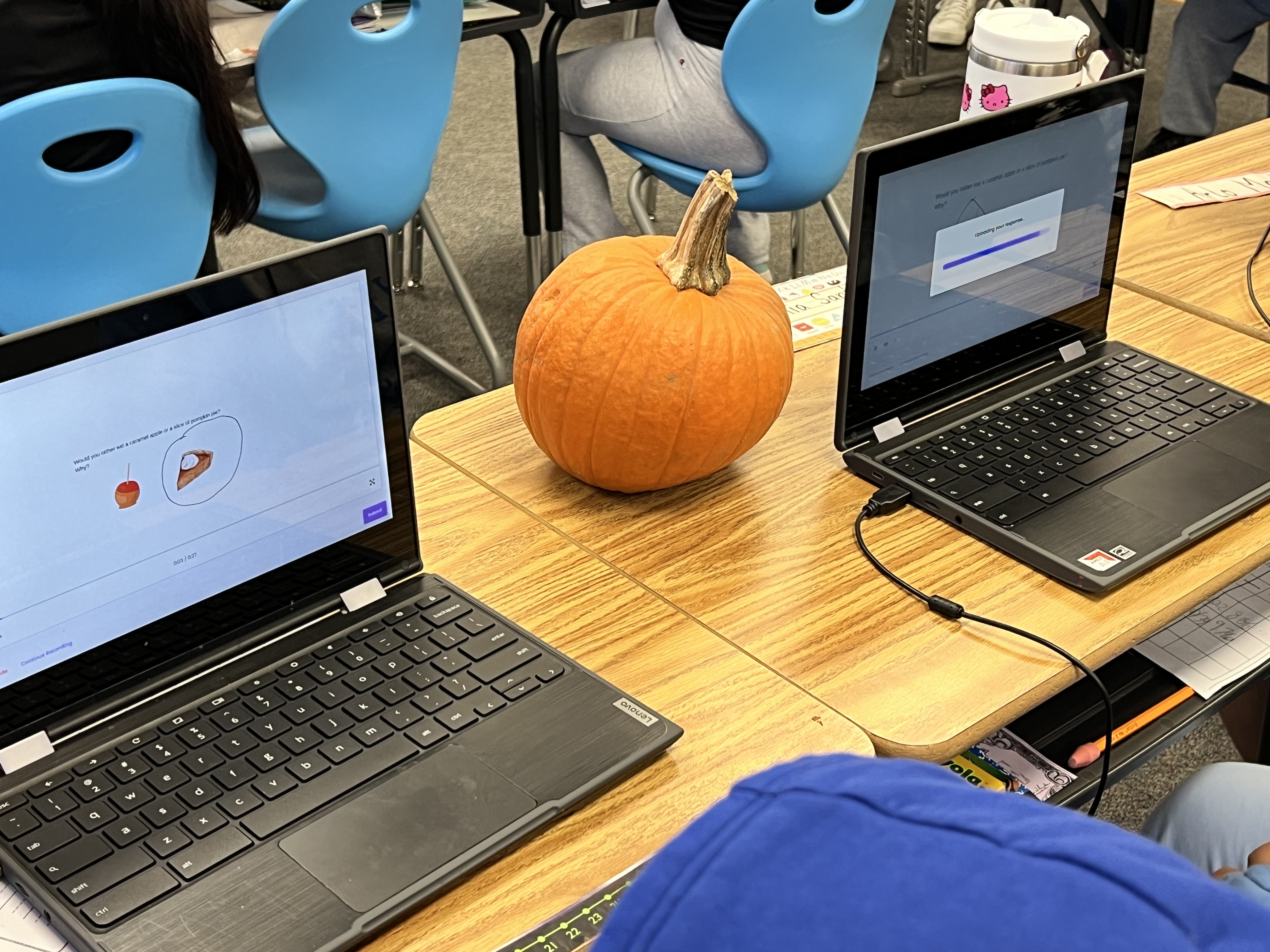
We started with a Would You Rather prompt: “Would you rather have a caramel apple or a slice of pumpkin pie?”

Students had to choose one and explain why. One student chose “neither” and explained his reasoning. Snorkl acknowledged his logic but scored it lower and challenged him to pick one, since the task was to make a choice, an excellent learning moment in a safe environment.

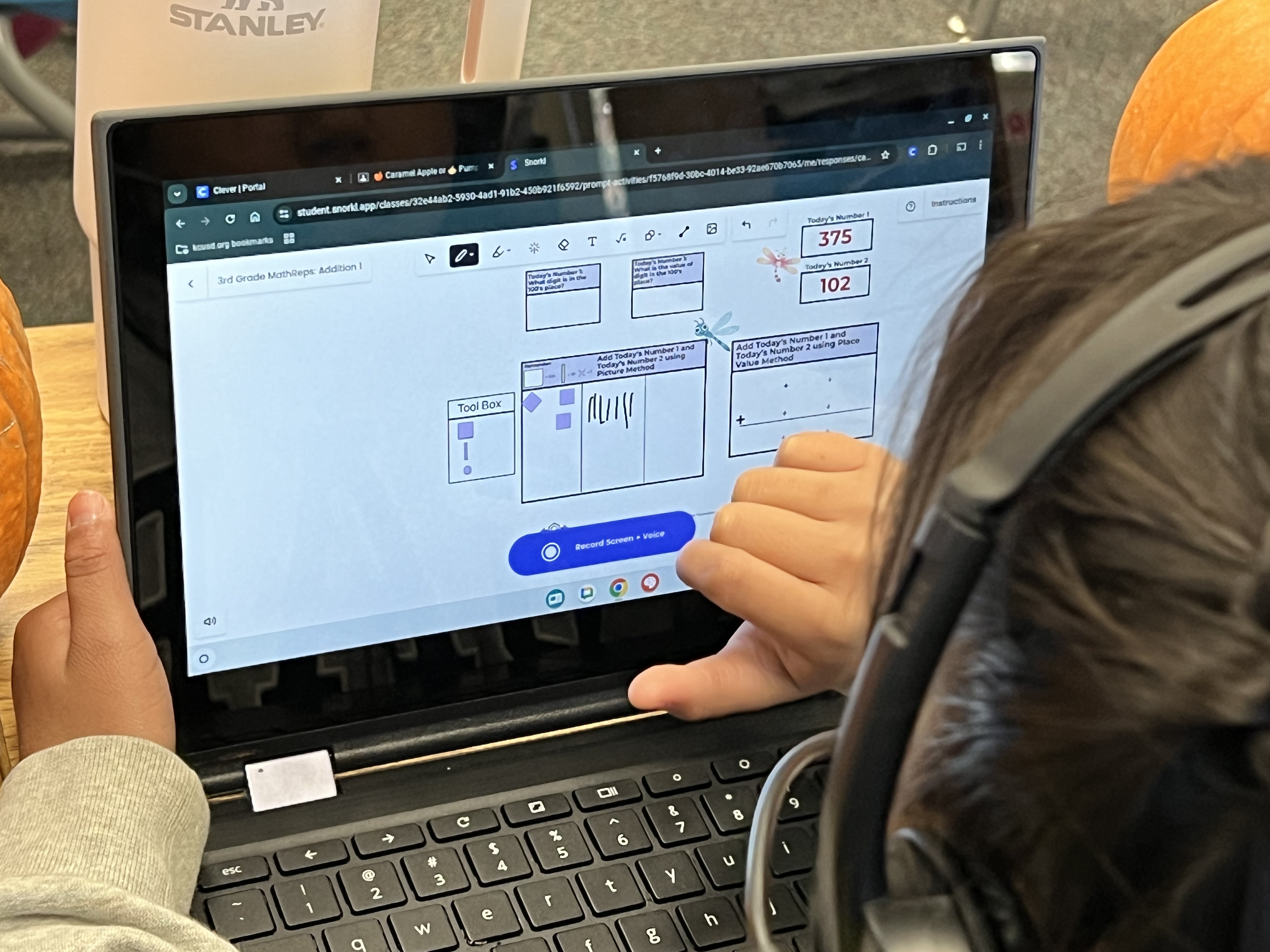
Then came the highlight: a 3rd Grade MathReps addition activity in Snorkl!

Students completed the task, then recorded their explanations to show their thinking. We know that when students can explain a process, their understanding deepens. Snorkl provided instant, helpful feedback that supported this reflection.

The best part? When students didn’t earn a 4/4, they wanted to improve. They read or listened to the feedback and tried again: some two or three times! The combination of MathReps and Snorkl fostered perseverance, reflection, and a sense of pride in learning. It was so exciting to witness.

Try MathReps in Snorkl!

Yes, MathReps are live in Snorkl—you’ll find them under the EduProtocols section. Currently, activities are available for grades K–4, with additional 4th-grade content and upper-grade levels forthcoming.

If you’d like to beta test upcoming MathReps in Snorkl, I’d love to have you join in! Just reach out and let me know.

So go ahead—try a MathRep in Snorkl. Let your students explore, explain, and shine.

Celebrating Creative Teaching Techniques in Classrooms

One of the things I love most about my role as an instructional coach/tech TOSA (Teacher on Special Assignment) is the opportunity to visit all the elementary sites in our district. Each school has its own rhythm and energy, and every teacher brings something special to the table. I get to see it all – the creative ideas, the quiet moments of connection, and the unique ways teachers make their classrooms feel like home for their students.

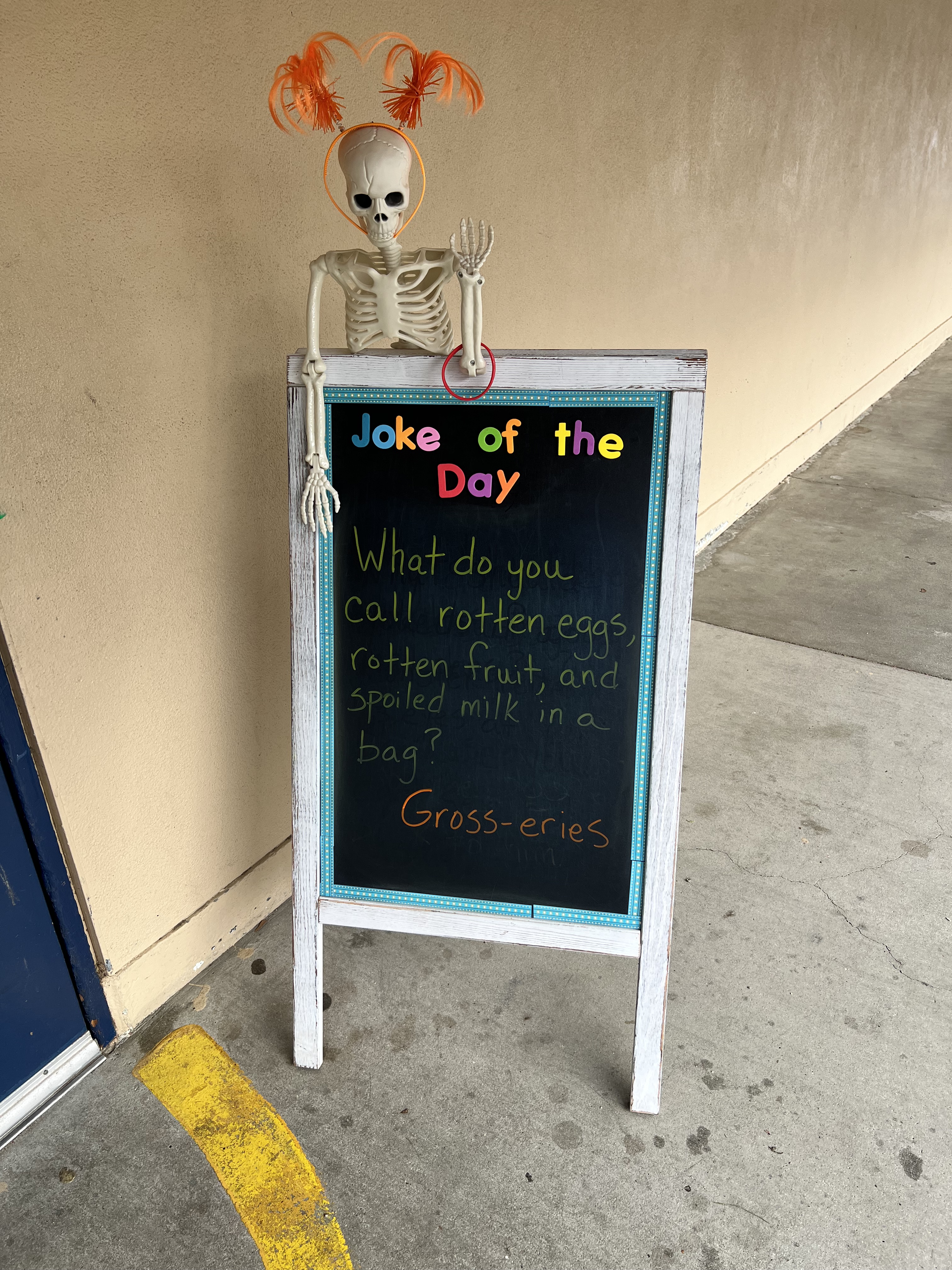
For example, at one school, a teacher sets out a small chalkboard outside her classroom each day. On it, she writes a Joke of the Day – something silly and lighthearted, but always guaranteed to get a few smiles and spark conversation. (Today’s joke: “What do you call rotten eggs, rotten fruit, and spoiled milk in a bag? Gross-eries!”) I love how she’s zhuzhed up the board, complete with a festive skeleton and a splash of color. It’s such a small thing, but it builds community and connection.

Another teacher has found a meaningful way to help students express themselves through emoji writing. I’m still learning exactly how she structures it, but I know students get the chance to write about their thoughts and feelings, and share them if they choose. It’s such a beautiful example of using something familiar and fun to help students build emotional awareness and voice.

Then there’s a teacher at another site who’s rethinking her approach to reading. She’s diving into novel studies, aligning them to the standards while keeping student engagement and learning front and center. It’s exciting to see teachers continually reflect, innovate, and take risks for the sake of their students.

Every week I’m reminded that innovation in education doesn’t always come from big changes—it’s often found in the small, thoughtful touches teachers bring to their classrooms.

The teachers in our district are doing amazing things every single day. I feel incredibly lucky to have a front-row seat to their creativity and care. One of my favorite parts of my job is being able to share these ideas, anonymously, of course, across the district. When I visit another site and a teacher says, “I’ve been wanting to try something new; any ideas?” I get to say, “Actually, I saw someone doing something really neat…”

I love this perk of my job. I love celebrating great teaching and helping ideas spread from one classroom to another. Because when we share, we all grow, and our students benefit most of all. And if you know me, you know that I’m a chronic over-sharer!

Your turn: What’s something small but meaningful you’ve seen or done in a classroom that builds connection or joy? Share it in the comments or with a colleague—it might just spark an idea that makes someone else’s classroom shine a little brighter.

The Power of Practice: Why MathReps Are the Missing Piece in Math Education

MathReps are more than just a worksheet—they are a targeted, daily instructional frame designed to leverage the science of learning to create genuine mathematical mastery. Here is a look at their inherent power and how they succeed where traditional, rigid curriculums often fail.

The Power of MathReps—What Makes Them Effective?

MathReps are powerful because their structure is built on proven principles of cognitive science and student-centered learning. (Note: MathReps are not a curriculum, rather a powerful tool that can enhance any curriculum.)

ReasonExplanation
Systematic Spaced Repetition (The Forgetting Curve)The daily repetition directly combats the ‘forgetting curve,’ a term that describes how quickly we forget new information. By consistently allowing students to revisit skills, MathReps move concepts from short-term memory into long-term mastery (fluency) in a way that end-of-unit tests or once-a-year review packets cannot.
Reduced Cognitive LoadThe basic lesson frame/graphic organizer is predictable and familiar. When the structure is constant, students don’t waste mental energy figuring out the assignment’s format, allowing them to dedicate all their cognitive load to solving the problem, making connections, and mastering the skill.
Connection Between Concepts and StrategiesMathReps are designed to promote a deeper understanding by requiring students to connect multiple representations (e.g., area models, partial quotients, and the traditional algorithm) on a single page. This helps them bridge the ‘how’ (procedural fluency) with the ‘why’ (conceptual understanding).
Daily Spiral Review of Multiple StandardsUnlike unit-by-unit curriculums that drop a topic once the unit is over, MathReps embed daily spiral review for several standards at once. This ensures that skills learned in September are still being practiced and reinforced in February, building confidence and preventing skill degradation.
Customization and DifferentiationThey are fully customizable, allowing teachers to select skills based on student data and individual needs. This makes MathReps a personalized learning tool that meets each student exactly where they are—a crucial advantage over a standardized textbook.
Fosters Long-Term SuccessReal-world evidence shows their success. One 3rd-grade team, for example, reported an increase in fraction proficiency from 19% to over 82% after implementing the daily repetition of MathReps.

How MathReps Do What Traditional Curriculums Fail To Do

Traditional math curriculums, whether purely procedural or heavily conceptual, often fail in three key areas that MathReps are specifically designed to address.

Failure of Traditional CurriculumsHow MathReps Solve It
Failure to Ensure Skill RetentionTraditional curriculums move on too quickly. If a student misses a concept or needs more time, they “fall off the train” and develop a learning gap that a built-in review system can’t fix.
Failure to Bridge Conceptual and Procedural FluencyCurriculums often lean too heavily in one direction: either “drill and kill” (rote memorization without understanding) or purely conceptual (understanding the theory but lacking computational skill). Often focusing on one skill at a time and never showing the connections.
Failure to Adequately Address Learning GapsStandardized, one-size-fits-all textbooks cannot accommodate a classroom where students may have learning gaps spanning multiple years. Pushing “high expectations” without addressing prior knowledge often leads to student failure.

MathReps provide the crucial daily rhythm of practice and reflection that students need to connect, internalize, and ultimately master their math skills, setting them up for success when confronted with more complex material.

You can find the full collection at MathReps.com.

You can see a deeper dive into the format and utility of these organizers in this video: MathReps is Where It’s At!.

Customize Your MathReps in Snorkl Easily

This past summer, I’ve been sharing insights about the MathReps collection available in Snorkl. In my recent post, New MathReps Available in Snorkl Library, I provided a quick guide on how to easily navigate the platform to discover your favorite MathReps. Don’t miss the latest video that demonstrates how to seamlessly add these resources to your library and customize them to suit your specific needs.

Math Dash Chats: Boost Classroom Discourse

Earlier this year, a simple idea sparked a solution to a common challenge in many classrooms: how to review math concepts and encourage student conversation when time is short. This led to the creation of Math Dash Chats.

Our district, like many others, was grappling with a noticeable gap in our curriculum—a lack of dedicated time for math discourse. We know that talking about math helps students solidify their understanding, but with so many standards to cover, where do you fit it in? I created Math Dash Chats for 3rd Grade, as an instructional coach who works closely with 3rd-grade teams, it felt like the perfect place to start. Since then, I’ve created sets for grades 2-6 and am excited to expand to grades 7 and 8 soon.

So, what exactly are Math Dash Chats, and how can they help your students? I’m so glad you asked!

What are Math Dash Chats?

Math Dash Chats are 36 prepared slides for your grade level (currently grades 2-6). The activity is designed to be a quick, five-minute daily review that gets students talking.

The slides are divided into six sections, five of which are based on Common Core domains like Geometry and Measurement, and the sixth is a directions section. Problems are hidden behind colorful “doors” [01:05], which you can view beforehand. Then, simply drag the questions over for a fun and engaging reveal.

How Do They Work?

The idea is simple: choose one “door” a day to discuss for about five minutes. This brief, focused discussion ensures a consistent review without taking up valuable class time. The topics covered are not just standard procedures; they encourage students to explore reasoning, number sense, and even domains like geometry or measurement that are often rushed through or left for the end of the year.

The video provides an example from the “Convince me that” category, where students are asked to prove that “4 tens is the same as 3 tens and 10 ones” [01:53]. This type of question promotes collaboration, and you might find that students want to use personal whiteboards or manipulatives to work through some of the problems together.

The Result

The response from teachers has been overwhelmingly positive. They love the ease of a no-prep, ready-to-go resource that gets students talking about math. Who doesn’t love a well-thought-out, free resource that is proven to work?

If you’re looking for a quick, impactful way to review math concepts and get your students engaged in meaningful math conversations, Math Dash Chats are for you!

Math Dash Chats Folder: Please make a copy of the desired slide deck for yourself by selecting ‘file’ > ‘make a copy’. If you receive a message that says ‘Access Denied’, it may be an issue with your district account. I’ve encountered this recently. If this happens, I suggest trying your personal account and sharing it with your district account. If that doesn’t work, contact me and we can try a few other options.